Today I've faced with interesting problem: in our .Net Framework 4.7.2 project we use PnP.Framework 1.6.0 (latest stable release currently) which was built with Microsoft.Graph 3.33.0. Then I updated Microsoft.Graph to the latest 4.3.0 version and after that UnifiedGroupsUtility.ListUnifiedGroups() method from PnP.Framework started to throw the following error:
Method not found: 'System.Threading.Tasks.Task`1<Microsoft.Graph.IGraphServiceGroupsCollectionPage> Microsoft.Graph.IGraphServiceGroupsCollectionRequest.GetAsync()'.
When I analyzed the error I found the following: Microsoft.Graph 3.33.0 contains IGraphServiceGroupsCollectionPage interface which has the following method:
In Microsoft.Graph 4.3.0 signature of this method has been changed: cancellationToken became optional parameter:
As result we got Method not found error in runtime. Interesting that app.config had binding redirect for Microsoft.Graph assembly but it didn't help in this case:
Also interesting that the same code works properly in project which targets .NET Core 3.1.
For .Net Framework project workaround was to copy code of UnifiedGroupsUtility.ListUnifiedGroups() from PnP.Framework to our project (fortunately it is open source) and then call this copied version instead of version from PnP.Framework. When new version of PnP.Framework will be released which will use newer version of Microsoft.Graph we may revert this change back.
If you need to fetch Azure AD groups or e.g. calculate total count of AAD groups via MS Graph API in PowerShell you may use Powershell-MicrosoftGraph project on github. At first you need to clone repository locally and copy it's folder to local PowerShell Modules folder:
We will make Graph requests using app permissions. It means that you need to have registered AAD app with permissions Groups.Read.All for fetching the groups:
Copy clientId and clientSecret of this AAD app and tenantId of your tenant (you may copy it from Azure portal > Azure AD overview tab). Having all this data in place run the following script:
If you use GraphServiceClient from Graph SDK for .Net in multi-thread app consider reusing it as static instance instead of creating own instances inside each thread. GraphServiceClient itself is thread safe (see here) and can be reused within multiple threads as is (without locks, synchronizations, etc).
Otherwise it will internally create multiple HttpClient instances and you may face with reaching sockets limit. Alternatively you may create static HttpClient and then pass it to the GraphServiceClient instances created per thread as it has special constructor for that:
public GraphServiceClient(HttpClient httpClient)
  : base("https://graph.microsoft.com/v1.0", httpClient)
{
}
If you create threads intensively there may be too many instances of HttpClient created and you will reach sockets limit. E.g. this is how it looked in Azure function app with queue-triggered Azure function when GraphServiceClient instances were created inside function call (own instance per thread):
I.e. there were 2K connection peaks and the following errors in the logs:
An operation on a socket could not be performed because the system lacked sufficient buffer space or because a queue was full
When I changed the code and reused static instance of GraphServiceClient connections count got stabilized:
In order to check what sensitivity label is applied to O365 group you may go to Azure portal > Azure Active Directory > Groups > select group. Sensitivity label will be displayed in overview tab of the group:
In order to get sensitivity label applied to O365 group programmatically via Graph API you may use the following endpoint:
However there is another problem with fetching groups images from Graph API which you have to care about: it should be done using delegated permissions. I.e. it is not possible to retrieve AAD groups images from Graph API using application permissions (at least on the moment of writing this blog post).
If you use Graph client library for C# you first need to create GraphServiceClient object and provide instance of class which implements IAuthenticationProvider interface and contains logic for authenticating requests using delegated permissions (via username and password). Here is how it may look like:
public class AzureAuthenticationProviderDelegatedPermissions : IAuthenticationProvider
{
 public async Task AuthenticateRequestAsync(HttpRequestMessage request)
 {
  var delegatedAccessToken = await GetGraphAccessTokenForDelegatedPermissionsAsync();

  request.Headers.Add("Authorization", "Bearer " + delegatedAccessToken);
 }

 public async Task<string> GetGraphAccessTokenForDelegatedPermissionsAsync()
 {
  string clientId = ...
  string userName = ...
  string password = ...
  string tenant = ...

  var creds = new UserPasswordCredential(userName, password);
  var authContext = new AuthenticationContext(string.Format("https://login.microsoftonline.com/{0}", tenant));
  var authResult = await authContext.AcquireTokenAsync("https://graph.microsoft.com", clientId, creds);
  return authResult.AccessToken;
 }
}

var graphClientDelegated = new GraphServiceClient(new AzureAuthenticationProviderDelegatedPermissions());
After that we may fetch group image from Graph API like that:
                var stream = Task.Run(async () =>
                {
                    var photo = await graphClient.Groups[groupId].Photos["64x64"].Content.Request().GetAsync();
                    return photo;

                }).GetAwaiter().GetResult();
Actual user account which is used for fetching groups images doesn’t need any special permissions: it may be regular user account without any admin rights.
When you create Team by sending HTTP POST request to beta Graph endpoint /beta/teams (see Create team) you need to specify exactly 1 user as an owner of the new team:
It may happen if user which is specified as owner of the team doesn’t have O365 license. In order to avoid this error use users with O365 license as team owners.
As you probably know you may call Graph API user app-only permissions and user delegated permissions. Here is example of authentication provider which can be used for calling Graph API under delegated permissions (using username and password):
public class AzureAuthenticationProviderDelegatedPermissions : IAuthenticationProvider
{
 public async Task AuthenticateRequestAsync(HttpRequestMessage request)
 {
  var delegatedAccessToken = await GetGraphAccessTokenForDelegatedPermissionsAsync();
  request.Headers.Add("Authorization", "Bearer " + delegatedAccessToken);
 }

 public async Task<string> GetGraphAccessTokenForDelegatedPermissionsAsync()
 {
  string clientId = ...;
  string userName = ...;
  string password = ...;
  string tenant = ...;

  var creds = new UserPasswordCredential(userName, password);
  var authContext = new AuthenticationContext(string.Format("https://login.microsoftonline.com/{0}", tenant));
  var authResult = await authContext.AcquireTokenAsync("https://graph.microsoft.com", clientId, creds);
  return authResult.AccessToken;
 }
}
However when you call Graph API with delegated permissions you may get the following error:
AADSTS7000218: The request body must contain the following parameter: 'client_assertion' or 'client_secret'.
The reason may be that app which app id is used for authentication is Default client type is set to private, i.e. “Treat application as a public client” set to No:
In order to fix it set Default client type to Public (set “Treat application as a public client” to Yes).
As you probably know we may retrieve groups and users photos via Graph API using the following endpoints (see Get photo):
GET /users/{id | userPrincipalName}/photo/$value
GET /groups/{id}/photo/$value
Note however that Graph stores photos of different sizes:
The supported sizes of HD photos on Office 365 are as follows: 48x48, 64x64, 96x96, 120x120, 240x240, 360x360, 432x432, 504x504, and 648x648.
and if we use default /photo endpoint it will return biggest available photo, i.e. 648x648. Depending on your scenario it may not be what you actually need as if you just need to display group logo or group member photo smaller images e.g. of 64x64 pixels size will be enough. And if you work with big photos of 648x648 size and reduce its size by css – page size may be very big and browser memory consumption will be much bigger:
So instead of using default /photo endpoint in MS Graph you may consider using of endpoints which return photo of specified smaller size:
GET /groups/{id}/photos/64x64//$value
or with Graph client library in .Net app:
var stream = Task.Run(async () =>
{
 var photo = await graphClient.Groups[groupId].Photos[Constants.GRAPH_IMAGES_CACHE_PHOTO_ID].Content.Request().GetAsync();
 return photo;
}).GetAwaiter().GetResult();
This code will return small image which may be more appropriate for your scenario:
Compare also sizes for big 648x648 image and small 64x64 image: 10Kb vs 2Kb.
If you want to test fetching of users photos via Graph API you may need to upload this photos so they will become available through Graph endpoints (see Get photo):
GET /me/photo/$value
GET /users/{id | userPrincipalName}/photo/$value
GET /groups/{id}/photo/$value
Of course you may do that programmatically using PUT requests like shown here:
PUT /me/photo/$value
PUT /users/{id | userPrincipalName}/photo/$value
PUT /groups/{id}/photo/$value
but if you need to do it quickly without developing tool for that you may use standard UI and upload photo from user’s Delve profile page:
1. Click icon with your account in top right corner and select My Office profile:
2. You will be redirected to your accounts Delve profile page:
3. On this page click “Upload a new photo” icon and upload photo of the user.
After that it will be possible to get users photos via Graph endpoints including photos with different sizes.
As you probably know we may get all groups where user is member using memberOf endpoint:
GET /users/{id | userPrincipalName}/memberOf
This endpoint returns only those groups where user was added as direct member. I.e. if user was added to GroupA and this GroupA was then added to GroupB – it will return only GroupA but not GruopB. However we often need to get all groups where user is member transitively. Fortunately it is also possible with another endpoint getMemberGroups:
POST /users/{id | userPrincipalName}/getMemberGroups
Until recently it was available only in Graph API itself – not in .Net Graph client library. Fortunately starting with 1.16 version Microsoft.Graph.User class got new property TransitiveMemberOf propery:
Using this property we may get all groups where user is member transitively. It supports paging so in order to get all groups we also need to iterate through pages. Here is the code example which does that:
private static List<Guid> GetUserGroupsTrasitively(string userPrincipalName)
{
 try
 {
  var graph = new GraphServiceClient(new AzureAuthenticationProvider());
  var groups = graph.Users[userPrincipalName].TransitiveMemberOf.Request().GetAsync().Result;
  if (groups == null)
  {
   return new List<Guid>();
  }

  var result = new List<Guid>();
  while (groups.Count > 0)
  {
   foreach (var group in groups)
   {
    result.Add(new Guid(group.Id));
   }

   if (groups.NextPageRequest != null)
   {
    groups = groups.NextPageRequest.GetAsync().Result;
   }
   else
   {
    break;
   }
  }

  return result;
 }
 catch (Exception x)
 {
  // error handling
 }
}
With MS Graph API you may use /beta/me/joinedGroups endpoint for getting list of groups where current user is a member. With the same endpoint you may also get isFavorite attribute for the group which shows whether or not user added group to favorites. However this endpoint has own issues: recently we found that it doesn’t return groups which were created from MS Teams: when you create new Team there also related Group is created. It is possible to get details of this group using basic groups endpoint
One possible explanation could be that internally /me/joinedgroups end point is routed to Outlook services which is not integrated with Teams well enough yet: when I tried to add createdDateTime attribute to the REST url (this attribute is returned for groups from basic endpoint - see above)
it returned error saying that returned entities have Microsoft.OutlookServices.Group type:
May be this is a bug or such functionality is not implemented in beta endpoint yet. For now I asked this question in StackOverflow – hope that somebody from MS Graph product team will answer it.
Sometime we need to get a list of all Office 365 groups where user is owner. It is relatively easy to get list of groups where user is a member using the following endpoints:
(First 2 end points work with app permissions while last endpoint works with delegated permissions). Unfortunately the same methods don’t work for owners. If you will try to user “ownerOf” in endpoints the following error will be shown:
Note that we’ve added “?$expand=owners” to the query string. With this additional param each group will be returned with list of it’s owners. After that yo may filter groups and include only those where current users is an owner. This is of course not so convenient and fast as above methods for owners but better than nothing.
In one of my previous posts I showed example how to create Azure AD groups with owners which were added right after group has been created: Create Azure AD group and set group owner using Microsoft Graph Client library. This approach works but on some tenants it may cause slowness and performance problems during group’s creation. You may have the following error when use this approach:
"code": "ResourceNotFound" "message": "Resource provisioning is in progress. Please try again."
This issue is also reported on github: After office 365 group is created, the group site provisioning is pending. Also if you will try to create group using PnP PowerShell or OfficeDevPnP library you may face with the same issue. PnP uses UnifiedGroupsUtility.CreateUnifiedGroup method to create groups. Let’s check it’s code:
public static UnifiedGroupEntity CreateUnifiedGroup(string displayName, string description, string mailNickname,
 string accessToken, string[] owners = null, string[] members = null, Stream groupLogo = null,
 bool isPrivate = false, int retryCount = 10, int delay = 500)
{
 UnifiedGroupEntity result = null;

 if (String.IsNullOrEmpty(displayName))
 {
  throw new ArgumentNullException(nameof(displayName));
 }

 if (String.IsNullOrEmpty(description))
 {
  throw new ArgumentNullException(nameof(description));
 }

 if (String.IsNullOrEmpty(mailNickname))
 {
  throw new ArgumentNullException(nameof(mailNickname));
 }

 if (String.IsNullOrEmpty(accessToken))
 {
  throw new ArgumentNullException(nameof(accessToken));
 }

 try
 {
  // Use a synchronous model to invoke the asynchronous process
  result = Task.Run(async () =>
  {
   var group = new UnifiedGroupEntity();

   var graphClient = CreateGraphClient(accessToken, retryCount, delay);

   // Prepare the group resource object
   var newGroup = new Microsoft.Graph.Group
   {
    DisplayName = displayName,
    Description = description,
    MailNickname = mailNickname,
    MailEnabled = true,
    SecurityEnabled = false,
    Visibility = isPrivate == true ? "Private" : "Public",
    GroupTypes = new List<string> { "Unified" },
   };

   Microsoft.Graph.Group addedGroup = null;
   String modernSiteUrl = null;

   // Add the group to the collection of groups (if it does not exist
   if (addedGroup == null)
   {
    addedGroup = await graphClient.Groups.Request().AddAsync(newGroup);

    if (addedGroup != null)
    {
     group.DisplayName = addedGroup.DisplayName;
     group.Description = addedGroup.Description;
     group.GroupId = addedGroup.Id;
     group.Mail = addedGroup.Mail;
     group.MailNickname = addedGroup.MailNickname;

     int imageRetryCount = retryCount;

     if (groupLogo != null)
     {
      using (var memGroupLogo = new MemoryStream())
      {
       groupLogo.CopyTo(memGroupLogo);

       while (imageRetryCount > 0)
       {
        bool groupLogoUpdated = false;
        memGroupLogo.Position = 0;

        using (var tempGroupLogo = new MemoryStream())
        {
         memGroupLogo.CopyTo(tempGroupLogo);
         tempGroupLogo.Position = 0;

         try
         {
          groupLogoUpdated = UpdateUnifiedGroup(addedGroup.Id, accessToken, groupLogo: tempGroupLogo);
         }
         catch
         {
          // Skip any exception and simply retry
         }
        }

        // In case of failure retry up to 10 times, with 500ms delay in between
        if (!groupLogoUpdated)
        {
         // Pop up the delay for the group image
         await Task.Delay(delay * (retryCount - imageRetryCount));
         imageRetryCount--;
        }
        else
        {
         break;
        }
       }
      }
     }

     int driveRetryCount = retryCount;

     while (driveRetryCount > 0 && String.IsNullOrEmpty(modernSiteUrl))
     {
      try
      {
       modernSiteUrl = GetUnifiedGroupSiteUrl(addedGroup.Id, accessToken);
      }
      catch
      {
       // Skip any exception and simply retry
      }

      // In case of failure retry up to 10 times, with 500ms delay in between
      if (String.IsNullOrEmpty(modernSiteUrl))
      {
       await Task.Delay(delay * (retryCount - driveRetryCount));
       driveRetryCount--;
      }
     }

     group.SiteUrl = modernSiteUrl;
    }
   }

   #region Handle group's owners

   if (owners != null && owners.Length > 0)
   {
    await UpdateOwners(owners, graphClient, addedGroup);
   }

   #endregion

   #region Handle group's members

   if (members != null && members.Length > 0)
   {
    await UpdateMembers(members, graphClient, addedGroup);
   }

   #endregion

   return (group);

  }).GetAwaiter().GetResult();
 }
 catch (ServiceException ex)
 {
  Log.Error(Constants.LOGGING_SOURCE, CoreResources.GraphExtensions_ErrorOccured, ex.Error.Message);
  throw;
 }
 return (result);
}
As you can see it basically uses the same approach: at first creates group and then adds owners/members using UpdateOwners/UpdateMembers methods.
Workaround for this problem is to not use Graph API client library and use plain REST calls and special OData bind syntax for owners and members like described here: Create a Group in Microsoft Graph API with a Owner
This approach works i.e. groups are created with owners and members from beginning and you don’t have to call another methods to add them separately. But is it possible to do the same with Graph API .Net client library (it would be good because it is more convenient to use client library than raw REST calls). The answer is yes it is possible and below it is shown how to do it.
Need to say that if you use only Graph API .Net client library classes it is not possible to do it. If you check property Group.Owners you will see that it has IGroupOwnersCollectionWithReferencesPage type:
In Graph API library there is only one class which implements this interface GroupOwnersCollectionWithReferencesPage and you can’t create instance of this class with owners specified and pass to Group.Owners property – it has to be used with Groups[].Request.Owners.References when you read group owners with pagination. So my first attempt was to create custom class which inherits IGroupOwnersCollectionWithReferencesPage interface which would allow list of user in constructor and then pass it’s instance to Group.Owners property before creation:
public class LightOwners : CollectionPage<DirectoryObject>, IGroupOwnersCollectionWithReferencesPage
{
    public LightOwners()
    {
    }

    public LightOwners(List<User> owners)
    {
        if (owners != null)
        {
            owners.ForEach(o => this.Add(o));
        }
    }

    public void InitializeNextPageRequest(IBaseClient client, string nextPageLinkString)
    {
    }

    public IGroupOwnersCollectionWithReferencesRequest NextPageRequest { get; }
}
This approach didn’t work: group object was serialized to JSON when client library made POST request to https://graph.microsoft.com/v1.0/groups for creating the group with property “owners” and all users’ properties were serialized as well – while we need "owners@odata.bind" and "https://graph.microsoft.com/v1.0/users/{id1}" string instead of fully serialized user object.
After that I tried another approach which worked: at first created new class GroupExtended which inherits Group class from Graph API library:
public class GroupExtended : Group
{
 [JsonProperty("owners@odata.bind", NullValueHandling = NullValueHandling.Ignore)]
 public string[] OwnersODataBind { get; set; }
 [JsonProperty("members@odata.bind", NullValueHandling = NullValueHandling.Ignore)]
 public string[] MembersODataBind { get; set; }
}
As you can see it adds 2 new properties OwnersODataBind and MembersODataBind which are serialized to "owners@odata.bind" and "members@odata.bind" respectively. Then I modified UnifiedGroupsUtility.CreateUnifiedGroup method to create groups with owners and members from beginning using single API call instead of adding them after group was created:
public static UnifiedGroupEntity CreateUnifiedGroup(string displayName, string description, string mailNickname,
 string accessToken, string[] owners = null, string[] members = null, Stream groupLogo = null,
 bool isPrivate = false, int retryCount = 10, int delay = 500)
{
 UnifiedGroupEntity result = null;

 if (String.IsNullOrEmpty(displayName))
 {
  throw new ArgumentNullException(nameof(displayName));
 }

 if (String.IsNullOrEmpty(description))
 {
  throw new ArgumentNullException(nameof(description));
 }

 if (String.IsNullOrEmpty(mailNickname))
 {
  throw new ArgumentNullException(nameof(mailNickname));
 }

 if (String.IsNullOrEmpty(accessToken))
 {
  throw new ArgumentNullException(nameof(accessToken));
 }

 try
 {
  // Use a synchronous model to invoke the asynchronous process
  result = Task.Run(async () =>
  {
   var group = new UnifiedGroupEntity();

   var graphClient = CreateGraphClient(accessToken, retryCount, delay);

   // Prepare the group resource object
   var newGroup = new GroupExtended
   {
    DisplayName = displayName,
    Description = description,
    MailNickname = mailNickname,
    MailEnabled = true,
    SecurityEnabled = false,
    Visibility = isPrivate == true ? "Private" : "Public",
    GroupTypes = new List<string> { "Unified" }
   };

   if (owners != null && owners.Length > 0)
   {
    var users = GetUsers(graphClient, owners);
    if (users != null)
    {
     newGroup.OwnersODataBind = users.Select(u => string.Format("https://graph.microsoft.com/v1.0/users/{0}", u.Id)).ToArray();
    }
   }

   if (members != null && members.Length > 0)
   {
    var users = GetUsers(graphClient, members);
    if (users != null)
    {
     newGroup.MembersODataBind = users.Select(u => string.Format("https://graph.microsoft.com/v1.0/users/{0}", u.Id)).ToArray();
    }
   }

   Microsoft.Graph.Group addedGroup = null;
   String modernSiteUrl = null;

   // Add the group to the collection of groups (if it does not exist
   if (addedGroup == null)
   {
    addedGroup = await graphClient.Groups.Request().AddAsync(newGroup);

    if (addedGroup != null)
    {
     group.DisplayName = addedGroup.DisplayName;
     group.Description = addedGroup.Description;
     group.GroupId = addedGroup.Id;
     group.Mail = addedGroup.Mail;
     group.MailNickname = addedGroup.MailNickname;

     int imageRetryCount = retryCount;

     if (groupLogo != null)
     {
      using (var memGroupLogo = new MemoryStream())
      {
       groupLogo.CopyTo(memGroupLogo);

       while (imageRetryCount > 0)
       {
        bool groupLogoUpdated = false;
        memGroupLogo.Position = 0;

        using (var tempGroupLogo = new MemoryStream())
        {
         memGroupLogo.CopyTo(tempGroupLogo);
         tempGroupLogo.Position = 0;

         try
         {
          groupLogoUpdated = UnifiedGroupsUtility.UpdateUnifiedGroup(addedGroup.Id, accessToken, groupLogo: tempGroupLogo);
         }
         catch
         {
          // Skip any exception and simply retry
         }
        }

        // In case of failure retry up to 10 times, with 500ms delay in between
        if (!groupLogoUpdated)
        {
         // Pop up the delay for the group image
         await Task.Delay(delay * (retryCount - imageRetryCount));
         imageRetryCount--;
        }
        else
        {
         break;
        }
       }
      }
     }

     int driveRetryCount = retryCount;

     while (driveRetryCount > 0 && String.IsNullOrEmpty(modernSiteUrl))
     {
      try
      {
       modernSiteUrl = UnifiedGroupsUtility.GetUnifiedGroupSiteUrl(addedGroup.Id, accessToken);
      }
      catch
      {
       // Skip any exception and simply retry
      }

      // In case of failure retry up to 10 times, with 500ms delay in between
      if (String.IsNullOrEmpty(modernSiteUrl))
      {
       await Task.Delay(delay * (retryCount - driveRetryCount));
       driveRetryCount--;
      }
     }

     group.SiteUrl = modernSiteUrl;
    }
   }

//                    #region Handle group's owners
//
//                    if (owners != null && owners.Length > 0)
//                    {
//                        await UpdateOwners(owners, graphClient, addedGroup);
//                    }
//
//                    #endregion

//                    #region Handle group's members
//
//                    if (members != null && members.Length > 0)
//                    {
//                        await UpdateMembers(members, graphClient, addedGroup);
//                    }
//
//                    #endregion

   return (group);

  }).GetAwaiter().GetResult();
 }
 catch (ServiceException ex)
 {
  //Log.Error(Constants.LOGGING_SOURCE, CoreResources.GraphExtensions_ErrorOccured, ex.Error.Message);
  throw;
 }
 return (result);
}

private static List<User> GetUsers(GraphServiceClient graphClient, string[] owners)
{
 if (owners == null)
 {
  return new List<User>();
 }
 var result = Task.Run(async () =>
 {
  var usersResult = new List<User>();
  var users = await graphClient.Users.Request().GetAsync();
  while (users.Count > 0)
  {
   foreach (var u in users)
   {
    if (owners.Any(o => u.UserPrincipalName.ToLower().Contains(o.ToLower())))
    {
     usersResult.Add(u);
    }
   }

   if (users.NextPageRequest != null)
   {
    users = await users.NextPageRequest.GetAsync();
   }
   else
   {
    break;
   }
  }

  return usersResult;
 }).GetAwaiter().GetResult();
 return result;
}

private static GraphServiceClient CreateGraphClient(String accessToken, int retryCount = 10, int delay = 500)
{
 // Creates a new GraphServiceClient instance using a custom PnPHttpProvider
 // which natively supports retry logic for throttled requests
 // Default are 10 retries with a base delay of 500ms
 var result = new GraphServiceClient(new DelegateAuthenticationProvider(
  async (requestMessage) =>
  {
   if (!String.IsNullOrEmpty(accessToken))
   {
    // Configure the HTTP bearer Authorization Header
    requestMessage.Headers.Authorization = new AuthenticationHeaderValue("bearer", accessToken);
   }
  }), new PnPHttpProvider(retryCount, delay));

 return (result);
}
And after that groups were created successfully with owners and members. At first code resolves specified users by their emails and then fills OwnersODataBind and MembersODataBind properties with strings like "https://graph.microsoft.com/v1.0/users/{id1}" (we need to resolve uses from Azure AD first in order to get their ids to build these strings). After that it creates group with single call and it contains specified owners and members. So this approach allows to create groups with owners and members set from beginning.
There is number of differences between apps registered in these 2 portals – you may check them e.g. here: About v2.0. For this article let’s notice that apps registered in v2 may support both web app and native platforms while apps in v1 may be either web app or native but not both. If you need them both you have to register 2 apps in v1 portal.
Recently we faced with a problem of getting user token for MS Graph i.e. token based on user credentials. We used the following code for that and it works properly for the app registered in v2 portal with native platform support:
var credentials = new Microsoft.IdentityModel.Clients.ActiveDirectory.UserCredential("username", "password");
var token = Task.Run(async () =>
{
    var authContext = new AuthenticationContext(string.Format("https://login.microsoftonline.com/{0}", "mytenant.onmicrosoft.com"));
    var authResult = await authContext.AcquireTokenAsync("https://graph.microsoft.com", appId, credentials);
    return authResult.AccessToken;
}).GetAwaiter().GetResult();
where for appId we used Azure AD app id registered in v2. When we tried to run the same code for the app registered in v1 portal with web app type the following error was shown:
Error: index was outside the bounds of the array
The same code also works properly for the app from v1 portal but with native type. I.e. it looks like AuthenticationContext.AcquireTokenAsync() method may fetch user token only for native app. If you know how to get user token for web app from v1 portal please share it in comments.
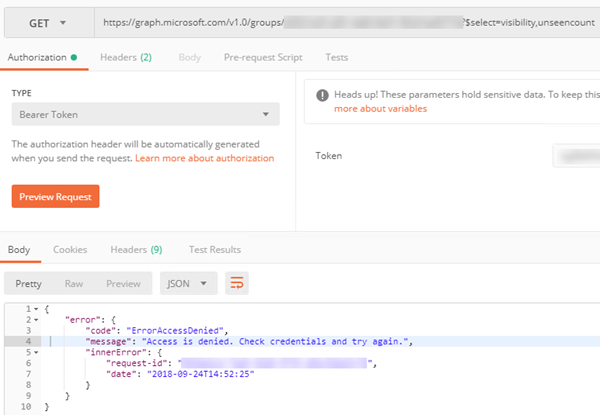
Some time ago I faced with interesting problem: when tried to get properties of Azure AD group using app token with app permissions (without available user context) through Graph API:
Investigation showed that problem was caused by unseencount property. When I tried to remove it – another selected property (visibility) was returned successfully:
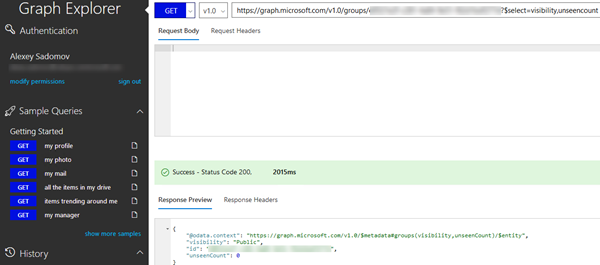
What was even more stranger is that in Graph explorer it worked:
Communication with MS support both on forums (see Can't get group's unseenCount) and via Azure support ticket helped to figure out the reason of this problem: in Postman I used app token with app permissions, while in Graph explorer I was authenticated with my own account (see above). I.e. in Graph explorer delegated permissions were used. And there is known issue in MS Graph (see Known issues with Microsoft Graph): unseencount may be retrieved only using delegated permissions:
“Examples of group features that support only delegated permissions:
Group conversations, events, photo
External senders, accepted or rejected senders, group subscription
When I checked in Fiddler request details of UpdateAsync() call I found that JSON representation of group object which is passed to HTTP PATCH method really has responseHeaders property:
Not sure why responseHeaders property is now added to the group object when it is first returned from graph. In order to avoid this error I used the following workaround: construct new Group object, specify group id and only those properties which should be updated. I.e. update object with minimal required specified properties:
var graphClient = CreateGraphClient(accessToken);
var existingGroup = await graphClient.Groups[groupId].Request().GetAsync();

var groupToUpdateMinimal = new Group();
groupToUpdateMinimal.Id = groupId;

bool updateGroup = false;
if (!string.IsNullOrEmpty(description) && existingGroup.Description != description)
{
	groupToUpdateMinimal.Description = description;
	updateGroup = true;
}

bool existingIsPrivate = existingGroup.Visibility == "Private";
if (isPrivate != null && existingIsPrivate != isPrivate.Value)
{
	groupToUpdateMinimal.Visibility = isPrivate.Value ? "Private" : "Public";
	updateGroup = true;
}

if (updateGroup)
{
	await graphClient.Groups[groupId].Request().UpdateAsync(groupToUpdateMinimal);
}
In this case only id, description and visibility properties are passed to HTTP PATCH method:
Some time ago MS announced possibility to specify groups classifications – see e.g. Classifications for Office365 Groups and Microsoft Teams. After you configured classifications on tenant level like shown in mentioned article when you go to Sharepoint app from your Office 365 App launcher (it will lead to https://{tenant}.sharepoint.com/_layouts/15/sharepoint.aspx) and choose “+ Create site” from the header – you will see dropdown list with specified classifications:
When you will create new site classification will be shown in the header:
Also if you will get related group via Graph API – classification will be returned with other group’s properties:
GET https://graph.microsoft.com/v1.0/groups/{id}/classification
But is it possible to update group’s classification programmatically? If we just try to send PACTH request on https://graph.microsoft.com/v1.0/groups/{id} endpoint we will get the following error:
{
    "error": {
        "code": "Request_BadRequest",
        "message": "Property 'classification' is read-only and cannot be set.",
        "innerError": {
            "request-id": "...",
            "date": "2018-05-28T14:22:55"
        }
    }
}
The answer is however yes it is possible: in order to set classification of O365 group via Graph API you need to use beta endpoint instead of v1.0: https://graph.microsoft.com/beta/groups/{id}. In this case property should be successfully updated.
Note that team site classification is stored in own property Site.Classification. So if you updated group’s classification you may also want to update classification of related site. If you use SiteExtension.SetSiteClassification from OfficeDevPnP both actions will be done automatically.
When you create user or group in Azure AD it is not immediately available in Sharepoint Online. I wrote about this problem here: Problem with delayed propagation of Azure AD groups to Sharepoint Online. In this post I will describe another interesting problem which may occur because of this delay.
Azure AD group members and owners may be retrieved with Graph API and with Rest API:
where instead of http://example.com you need to use url of your Sharepoint site.
The problem is that until Azure AD data won’t be fully synced to Sharepoint Online Rest API may return not correct data. E.g. /members endpoint may return actually owners, while /owners endpoint may not return users at all. Depending on how fast MS data center will propagate changes it may take up to several hours. So be aware about this problem.
The main advantage of Rest API endpoint is that it returns members count. While in Gtaph API $count query string parameter is not supported for users and groups: Use query parameters to customize responses:
Note: $count is not supported for collections of resources that derive from directoryObject like collections of users or groups.
So you may want to use Rest but notice that it may work incorrectly first several hours.
Recently I showed how to list Azure AD/O365 groups in Powershell using REST Graph API: see List Azure AD groups via Rest Graph API in Powershell. In this post I will show how to do the same thing using CSOM. It may be interesting especially in part of how to obtain access token based on client id and client secret via CSOM and how it differs from REST approach.