URL rewrite IIS module allows you to define rules, conditions and actions based on incoming URL pattern and variables (host, query string, etc). E.g. using it you may setup permanent redirects (http status code 301) from one URL to another. Often it is used for SEO, for example redirect from non-www URL to www. Redirect of course is not the only possible action which can be defined in URL rewrite module. Here is the full list of available actions:
- Rewrite
- None
- Redirect
- Custom response
- Abort request
Rewrite action is frequently used for defining user-friendly URLs, which also gives advantages for SEO and for general usability. So URL rewrite module is quite powerful tool and in my opinion every web developer which works with Microsoft stack should get familiar with it in order to create advanced web applications.
However if you use this IIS extension in conjunction with custom http modules, you may encounter with the following problem: BeginRequest handlers, defined in the http modules, are not called when URL of incoming request matches conditions in the URL rewrite module’s rule, and it tries to make permanent redirect to another URL. However EndRequest is called every time, regardless of was request redirected by IIS module or not. If you use Unit of work pattern and IoC you may get exception because of that. E.g. consider the following example (StructureMap is used as IoC):
1: public class UnitOfWorkModule : IHttpModule
2: {
3: public void Init(HttpApplication context)
4: {
5: context.BeginRequest += context_BeginRequest;
6: context.EndRequest += context_EndRequest;
7: }
8:
9: public void Dispose()
10: {
11: }
12:
13: private void context_BeginRequest(object sender, EventArgs e)
14: {
15: var instance = ObjectFactory.GetInstance<IUnitOfWork>();
16: instance.Begin();
17: }
18:
19: private void context_EndRequest(object sender, EventArgs e)
20: {
21: var instance = ObjectFactory.GetInstance<IUnitOfWork>();
22: try
23: {
24: instance.Commit();
25: }
26: finally
27: {
28: instance.Dispose();
29: }
30: }
31: }
In the BeginRequest we get instance of IUnitOfWork from IoC and call Begin() method. Under the hood it starts transaction. In the EndRequest we again get instance of IUnitOfWork and call Commit() method. Without URL rewrite it works because lifetime of unit of work is defined as per-request (in terms of StructureMap it has InstanceScope.Hybrid scope, in order to be able to write unit tests without http request). But if BeginMethod handler is not called, we get exception because transaction was not started and there is nothing to commit.
I tried to search for this problem and found several mentions on the stackoverflow without solution, so decided to analyze it. First of all we need to understand how URL rewrite module works. I strongly recommend the following article for understanding the basics: IIS URL Rewriting and ASP.NET Routing. The most important thing for us is the following:
The URL Rewrite module is a native code module that plugs into the request-processing pipeline at the Pre-begin Request or Begin Request stage.
I will also copy the image from original article here for convenience:
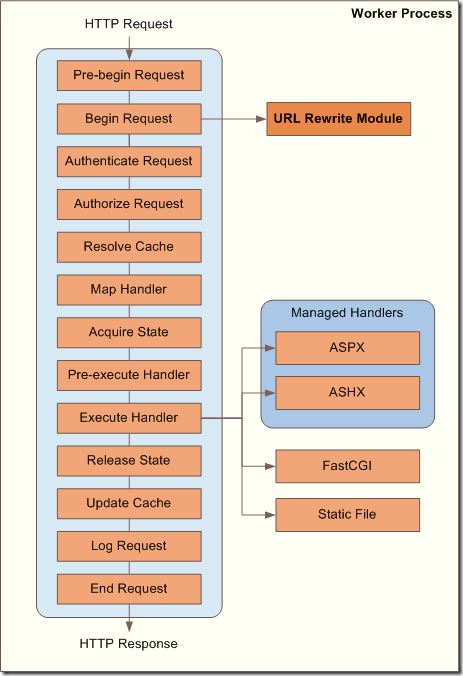
So now we know where URL rewrite module is called: “at the Pre-begin Request or Begin Request stage”. I wanted to clarify on what particular step it was called in my case (don’t fully get this “or”, i.e. when it is called in Pre-begin request and when in Begin request. If you know that please share it in comments). In order to do this I enabled Trace feature in IIS and used Failed request mapping tracing for details (see this post about this IIS feature: Using Failed Request Tracing to Trace Rewrite Rules) and found that it was executed on pre-request stage:
PRE_BEGIN_REQUEST_STARTModuleName="RewriteModule"
PRE_BEGIN_REQUEST_ENDModuleName="RewriteModule", NotificationStatus="NOTIFICATION_CONTINUE"
After that for testing I created 2 simple http modules in the Hello world ASP.Net web application with the following code:
1: public class Module1 : IHttpModule
2: {
3: public static object lockObj = new object();
4:
5: public void Init(HttpApplication context)
6: {
7: context.BeginRequest += context_BeginRequest;
8: context.EndRequest += context_EndRequest;
9: }
10:
11: void context_BeginRequest(object sender, EventArgs e)
12: {
13: lock (lockObj)
14: {
15: File.AppendAllText("c:\\temp\\modules.log",
16: Thread.CurrentThread.ManagedThreadId +
17: " Module1.BeginRequest" + Environment.NewLine);
18: }
19: }
20:
21: void context_EndRequest(object sender, EventArgs e)
22: {
23: lock (lockObj)
24: {
25: File.AppendAllText("c:\\temp\\modules.log",
26: Thread.CurrentThread.ManagedThreadId +
27: " Module1.EndRequest" + Environment.NewLine);
28: }
29: }
30:
31: public void Dispose()
32: {
33: }
34: }
And second one:
1: public class Module2 : IHttpModule
2: {
3: public void Init(HttpApplication context)
4: {
5: context.BeginRequest += context_BeginRequest;
6: context.EndRequest += context_EndRequest;
7: }
8:
9: void context_BeginRequest(object sender, EventArgs e)
10: {
11: lock (Module1.lockObj)
12: {
13: File.AppendAllText("c:\\temp\\modules.log",
14: Thread.CurrentThread.ManagedThreadId +
15: " Module2.BeginRequest" + Environment.NewLine);
16: }
17: }
18:
19: void context_EndRequest(object sender, EventArgs e)
20: {
21: lock (Module1.lockObj)
22: {
23: File.AppendAllText("c:\\temp\\modules.log",
24: Thread.CurrentThread.ManagedThreadId +
25: " Module2.EndRequest" + Environment.NewLine);
26: }
27: }
28:
29: public void Dispose()
30: {
31: }
32: }
I.e. both modules make the same: register handlers for BeginRequest and EndRequest and just log the execution to the text file (lock is used in order to synchronize access for the log file from several threads). Then registered them in web.config in the following order:
1: <system.webServer>
2: <modules runAllManagedModulesForAllRequests="true">
3: <remove name="Module1"/>
4: <remove name="Module2"/>
5: <add name="Module1" type="MyNamespace.Module1"/>
6: <add name="Module2" type="MyNamespace.Module2"/>
7: </modules>
8: </system.webServer>
Here how log looks like in this case:
Module1.BeginRequest
Module2.BeginRequest
Module1.EndRequest
Module2.EndRequest
(I removed thread id as it is not relevant here. Before of testing I removed all references to css and js files from the test web application, so there was always only one thread/http request). This is quite clear: at the first Module1 is executed, then Module2, because they are defined in this order in the web.config.
Now we need to simulate redirection from URL rewrite module. In our situation rewrite module will be executed before both modules’ BeginRequest (because it is executed on pre-BeginRequest stage as we saw above). So I changed the code of Module1 which is called first and added permanent redirect:
1: void context_BeginRequest(object sender, EventArgs e)
2: {
3: lock (lockObj)
4: {
5: File.AppendAllText("c:\\temp\\modules.log",
6: Thread.CurrentThread.ManagedThreadId +
7: " Module1.BeginRequest" + Environment.NewLine);
8: }
9: HttpContext.Current.Response.RedirectPermanent("http://google.com");
10: }
(RedirectPermanent() method was added in .Net 4.0). Now I got the following log:
Module1.BeginRequest
Module1.EndRequest
Module2.EndRequest
As you can see BeginRequest in Module2 was not executed at all, but EndRequest was executed for all modules anyway. Module1 in this example plays role of URL rewrite module, while Module2 – custom http module. This example shows that when redirect is called BeginRequest handlers are skipped (Module1.BeginRequest is not taken into account because redirect was made from it), but EndRequest are executed always, even if response is redirected (probably it is executed in finally block so it works also for ThreadAbortException which occurs when request processing is interrupted).
As we saw in example above this is the normal ASP.Net behavior. So now we only have to fix the problem in our http module with unit of work. It is quite easy now when we understand the internals:
1: public class UnitOfWorkModule : IHttpModule
2: {
3: public void Init(HttpApplication context)
4: {
5: context.BeginRequest += context_BeginRequest;
6: context.EndRequest += context_EndRequest;
7: }
8:
9: public void Dispose()
10: {
11:
12: }
13:
14: private void context_BeginRequest(object sender, EventArgs e)
15: {
16: var instance = ObjectFactory.GetInstance<IUnitOfWork>();
17: instance.Begin();
18: }
19:
20: private void context_EndRequest(object sender, EventArgs e)
21: {
22: if (HttpContext.Current.Response.StatusCode == (int)HttpStatusCode.MovedPermanently)
23: {
24: return;
25: }
26:
27: var instance = ObjectFactory.GetInstance<IUnitOfWork>();
28: try
29: {
30: instance.Commit();
31: }
32: finally
33: {
34: instance.Dispose();
35: }
36: }
37: }
In the EndRequest handler we added a check that current status code is not 301 (HttpStatusCode.MovedPermanently) because we know that BeginRequest was not called in this case and unit of work is not initialized. If it is, just return without trying to commit unit of work.
Hope that this post will help to those who will face with similar problem.

